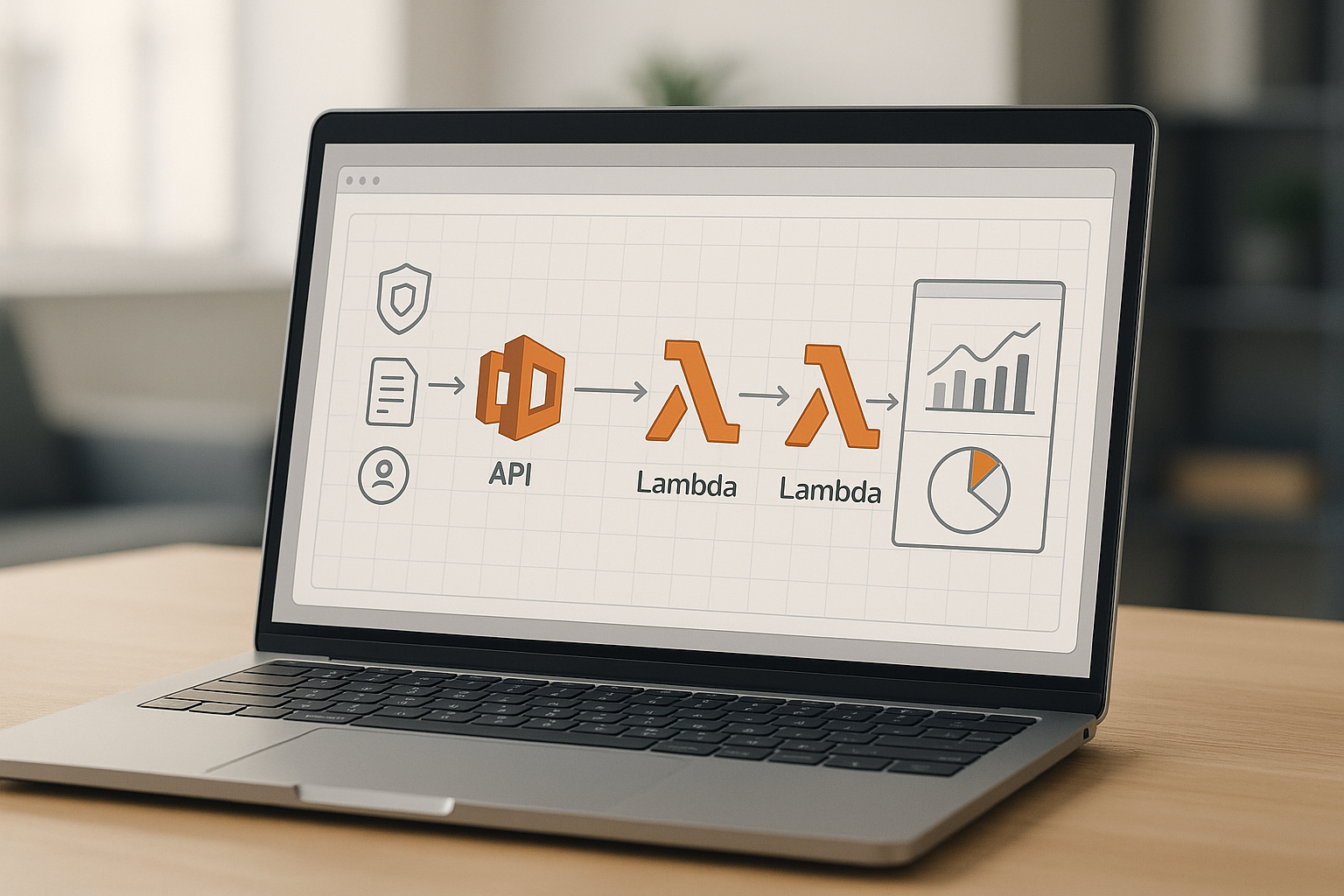
If you want a fast, secure, and low-ops way to publish endpoints, building a REST API with AWS API Gateway and Lambda is the most direct serverless path. In plain terms, API Gateway receives HTTP requests and forwards them to Lambda functions, which run your code on demand—no servers to manage. In this guide, you’ll build a production-ready REST API, step by step, with practical guardrails for design, security, deployments, and operations. At a glance, the flow is: choose your API product, design the contract, wire Lambda integrations, validate and secure requests, control traffic with throttling and usage plans, deploy to stages and domains, instrument logging and tracing, and automate testing and releases. By the end, you’ll have a blueprint you can repeat across teams with confidence.
Definition: API Gateway is the managed entry point for your HTTP endpoints; Lambda is the serverless runtime that executes your business logic in response to those requests.
Quick steps: (1) Choose REST API and architecture, (2) Draft your OpenAPI contract, (3) Set up roles and permissions, (4) Create Lambda functions with sensible memory/timeout, (5) Integrate API Gateway and Lambda, (6) Add validation and error mapping, (7) Enable CORS correctly, (8) Configure authorization, (9) Apply throttling and usage plans, (10) Deploy stages and custom domains, (11) Turn on logging/metrics/tracing, (12) Test locally and automate CI/CD.
Outcome: You’ll ship a maintainable, secure API with predictable performance and clear operational visibility.
1. Decide on the API product and architecture
Start by selecting the API Gateway product that matches your needs and the architectural pattern you’ll follow. API Gateway offers REST APIs and HTTP APIs; both are “RESTful,” but REST APIs include richer features like request validation, usage plans and API keys, per-client throttling, and private endpoints—handy for production control and monetization. For this guide, you’ll use a REST API so you can apply usage plans, fine-grained throttles, and more advanced stage features. Next, decide between Lambda proxy integration (you receive the full HTTP request in your function and return a structured response) and non-proxy integration (you use mapping templates to translate between the client and your function). Proxy integration keeps your function logic simple and consistent across methods, while non-proxy is useful when you need strict request/response shaping at the edge without changing your code.
Why it matters
Choosing the product and integration pattern early locks in capabilities that affect security, governance, and cost. REST APIs bring mature controls like usage plans and request validation you’ll rely on later. Lambda proxy integration lets you iterate on endpoints quickly, supports flexible routing in code, and simplifies error handling patterns. Documentation from AWS details the feature differences between REST and HTTP APIs and explains the Lambda proxy model so you can make an informed choice.
Numbers & guardrails
- Prefer REST API if you need API keys, request validation, per-client throttling, or private endpoints; otherwise HTTP API may be a leaner option.
- Proxy integration centralizes routing and serialization in code; non-proxy requires Velocity Template Language (VTL) mapping at the edge.
Synthesis: Commit to REST API with Lambda proxy integration for maximum flexibility and governance; you can still introduce select VTL mappings later where policy or legacy constraints require them.
2. Design the contract with OpenAPI (design-first)
Before writing code, define your resources, methods, parameters, schemas, and responses in an OpenAPI document. This forces clarity on naming, versioning paths (for example, /v1/orders), body schemas, and error envelopes. API Gateway can import your OpenAPI to create resources and methods automatically, and you can round-trip updates as your design evolves. Treat the contract as the source of truth: keep it in version control, review it like code, and generate documentation clients can consume. Prefer consistent resource names and predictable status codes: 200/201/204 for success, 400/404/409/422 for client issues, 500/503 for server faults. Use enums for stable fields and examples to show real payloads.
How to do it
- Start a concise OpenAPI spec with the paths, components/schemas, and a shared error schema.
- Import the definition into API Gateway; update via merge or overwrite as your contract matures.
- Use API Gateway’s OpenAPI extensions (like x-amazon-apigateway-integration) to declare Lambda integrations when you’re ready to wire methods.
- Keep response examples in the spec so testing and documentation stay in lockstep.
Numbers & guardrails
- API Gateway supports OpenAPI v2.0 and v3.0 (with certain vendor extensions). Keep your spec lean and validate with linters to prevent console import failures.
Synthesis: A design-first OpenAPI keeps teams aligned, speeds creation in API Gateway, and anchors downstream docs and tests to a single, reviewed contract.
3. Set up roles and minimal permissions
Give every component the least privilege it needs—and nothing more. API Gateway requires permission to push logs to CloudWatch (an AWS-managed role simplifies this), and each Lambda function needs an execution role granting access to only the resources it touches (for example, a specific DynamoDB table, S3 bucket, or secret). If a function must reach private resources, attach it to a VPC with tightly scoped security groups and subnets. Separate build/deploy roles from runtime roles to reduce blast radius. For local and CI use, prefer short-lived credentials through federated identities to avoid long-lived keys.
Mini-checklist
- API Gateway → CloudWatch: Attach the managed role for pushing logs.
- Lambda execution role: Grant only the actions needed (for example, dynamodb:GetItem, not dynamodb:*).
- VPC access: If required, attach the Lambda to a VPC; understand that extra EC2 permissions are involved to manage network interfaces. AWS Documentation
- Separation of duties: Different roles for deployment vs. runtime; limit wildcard actions and resource *.
Synthesis: Clear IAM boundaries reduce risk and make incident response easier because you can reason about who can do what at a glance. AWS Documentation
4. Create Lambda functions with performance-aware settings
Author your function in a familiar runtime and set the two most important performance levers: memory and timeout. In Lambda, increasing memory also increases available CPU proportionally, so memory is your main dial for throughput and latency. Start with a moderate memory size, load test representative traffic, and tune upward until you hit a latency target with headroom. Set a timeout that’s long enough for normal requests but short enough to fail fast on dependency issues; combine this with upstream timeouts and retries so your API remains responsive under stress. For predictable p99 latency on interactive endpoints, consider provisioned concurrency to pre-warm environments.
Numbers & guardrails
- Memory can be set between 128 MB and 10,240 MB, with CPU scaling proportionally; around 1,769 MB approximates one vCPU.
- Timeouts can be up to 900 seconds; web endpoints are typically far lower to keep clients snappy.
- Provisioned concurrency smooths cold starts for latency-sensitive paths; add a small buffer above peak. AWS Documentation
Mini case
You need median ~60 ms and p95 ~120 ms for GET /products. Start at 512 MB, run a load test; p95 lands ~200 ms. Increase to 1,024 MB and retest; p95 drops to ~120 ms with acceptable cost. Lock 1,024 MB and set timeout to 2–3 seconds, adding provisioned concurrency of a few warm environments to stabilize tail latency.
Synthesis: Treat memory and timeout as tunable SLO dials; a small increase in memory can yield large latency wins and fewer retries across the stack.
5. Integrate API Gateway and Lambda cleanly
With Lambda proxy integration, API Gateway forwards the full request (method, path, headers, query string, body) to your function and expects a structured response with statusCode, headers, and body. Keep your handler thin: parse input, call your domain logic, map exceptions to HTTP codes, and return a normalized response. Use path parameters like /orders/{id} and query parameters for filters; avoid overloading POST with non-resource actions—keep verbs aligned with resources. If you need to transform payloads at the edge (for legacy clients or partner contracts), apply VTL mapping templates selectively.
How to do it
- Choose Lambda proxy integration for most routes; wire the function once and route via code.
- Use consistent error envelopes: { code, message, details }, and set Content-Type correctly.
- Apply VTL mapping for special cases (for example, XML interop), but keep it minimal to reduce complexity.
- Consider binary media types for file endpoints; base64-encode and configure binaryMediaTypes on the API.
Common mistakes
- Returning plain strings without statusCode and headers in proxy mode.
- Mixing mapping templates and proxy returns haphazardly, which confuses clients.
- Forgetting to set isBase64Encoded for binary responses, leading to corrupted downloads.
Synthesis: Default to proxy integration for speed and consistency; reach for VTL only when a precise transformation policy belongs at the edge.
6. Validate inputs and map errors for predictable contracts
Push basic validation to the edge so your functions waste no cycles on malformed calls. In API Gateway, attach request models and enable request validation to ensure required parameters and body shapes exist before invoking Lambda. Use mapping templates to normalize weird inputs (for example, snake_case to camelCase) and to translate internal exceptions into stable HTTP responses for clients. For failure modes, prefer 4xx for client issues and 5xx for internal faults; log structured errors with correlation IDs so you can trace misbehaving calls across services.
Numbers & guardrails
- Enable validation for required headers, path, and query parameters to short-circuit bad calls with a clean 400.
- Keep response bodies small and consistent; if sending files, configure binary media types explicitly.
Mini-checklist
- Define components/schemas in OpenAPI and bind them to methods.
- Turn on Request Validator for “parameters and body” at the stage/method.
- Map internal error classes to HTTP codes and a shared error schema.
- Add x-correlation-id passthrough in a response mapping for downstream tracing.
Synthesis: Contracts feel reliable when validation and error mapping are consistent; clients build against your API once and don’t need per-endpoint special cases.
7. Enable CORS the right way
If your API is called from browsers on a different origin, you must enable CORS (Cross-Origin Resource Sharing). For each resource and method, ensure the correct Access-Control-Allow-Origin, Access-Control-Allow-Methods, and Access-Control-Allow-Headers are returned, and add an OPTIONS method for preflight checks. Avoid blanket wildcards if you send credentials; specify allowed origins explicitly. Test both preflight and actual calls, and remember that CORS errors surface in the browser console, not always in the network tab, which can mislead debugging.
How to do it
- Add OPTIONS with a MOCK or integration that returns the right headers.
- Reflect only the origins you trust; avoid * when using cookies or Authorization headers.
- Ensure your main methods (GET/POST/PUT/DELETE) include matching CORS headers on success and error responses.
Common pitfalls
- Enabling CORS on OPTIONS only; your actual methods also need CORS headers.
- Forgetting Access-Control-Expose-Headers for custom IDs you want visible to client code.
- Not including Content-Type or Authorization in Access-Control-Allow-Headers when sending JSON or bearer tokens.
Synthesis: Treat CORS as part of your API contract; when configured narrowly and tested, it closes an entire class of “works locally, fails in browser” bugs.
8. Choose and configure authorization deliberately
Pick an authorization mode per route based on who calls it and how you distribute credentials. Use IAM authorization for service-to-service calls within AWS accounts and trusted partners (SigV4 signed requests). Use JWT authorizers (for example, Amazon Cognito user pools) for user-facing apps where the client presents a bearer token. Use Lambda authorizers when you need custom logic (for example, API keys in a proprietary header, mTLS metadata, or external identity providers not supported natively). Combine usage plans and API keys for coarse access control and rate limiting—not as a sole security mechanism.
Quick comparison
| Scenario | Recommended auth | Notes |
|---|---|---|
| Server-to-server within AWS | IAM | Simple with SigV4; use execute-api permission. |
| Web/mobile user sessions | JWT authorizer | Offload validation to API Gateway; map scopes to routes. |
| Custom token or partner header | Lambda authorizer | Returns an IAM policy; supports complex policies. AWS Documentation |
| Monetized/public plans | API keys + usage plan | Quotas and throttling; not authentication. |
Numbers & guardrails
- Prefer short-lived tokens and enforce scopes/claims per route.
- Keep authorizer latency low; it runs on every call to protected routes.
- Reuse authorizers across methods to avoid duplication.
Synthesis: A per-route authorization matrix keeps security transparent and evolvable; you can tighten or relax access without code changes to business logic.
9. Apply throttling, quotas, and usage plans
Protect your backend and shape traffic by combining account-level throttling with per-method and per-client limits. Usage plans let you issue API keys to clients and assign request rate and burst controls as well as quotas over time windows. Place stricter limits on expensive endpoints (for example, search with multiple joins) and looser ones on idempotent reads. Monitor 429 responses and right-size throttles so legitimate bursts succeed without starving other tenants.
How to do it
- Create a usage plan, define rate and burst, and attach selected stages/methods.
- Generate API keys for clients; rotate them and deprecate unused keys.
- Use method-level throttling to protect hotspots; set stage-level defaults as a baseline.
Numbers & guardrails
- API Gateway enforces account-level throttling with a token bucket model (rate + burst), and usage plans apply per-client controls.
- Track the 4XXError and ThrottledRequests metrics; alert if sustained. AWS Documentation
Mini case
Your /reports endpoint is compute-heavy. You set per-client rate to 5 RPS and burst to 20, while general reads are 50/200. You then add a monthly quota per key to deter overuse. After monitoring, you relax to 10/40 for /reports when caching reduces backend load.
Synthesis: Thoughtful throttling absorbs bursts, keeps noisy neighbors in check, and preserves predictable latency for everyone.
10. Deploy to stages and map a custom domain
Use stages (for example, dev, staging, prod) as named references to deployments. Each stage can have its own logging level, caching, throttling, variables, and even canary settings for gradual rollouts. When you’re ready for human-friendly URLs, attach a custom domain and map base paths like /api to stage URLs. For private APIs, you can also map private custom domains within your network boundaries.
How to do it
- Create a deployment from your API changes; promote to staging and then prod.
- Configure stage variables (for example, TABLE_NAME) to decouple code from environment differences.
- Attach a custom domain with a certificate from AWS Certificate Manager; map base paths to stages.
- For internal consumers, consider private endpoints and private custom domains.
Numbers & guardrails
- Use canary releases to shift a small percentage of traffic to a new deployment; measure error rate and latency before promoting.
- Choose edge-optimized domains for global clients and regional for localized traffic or private networking.
Synthesis: Stages and custom domains separate concerns—safe promotion and friendly URLs—so you can ship confidently without brittle rewrites.
11. Turn on logging, metrics, and tracing
Observe your API from request to function to dependency. Enable execution logs and access logs in API Gateway and emit structured logs in your Lambda functions. Create CloudWatch dashboards for key metrics: Count, Latency, 5XXError, 4XXError, IntegrationLatency, and ThrottledRequests. Add AWS X-Ray tracing on the stage and in Lambda to see end-to-end paths and hotspots. Prefer JSON access logs with a consistent schema so downstream tools can parse fields without regex gymnastics.
How to do it
- Grant API Gateway the managed role to push logs, then enable access and execution logs per stage.
- Turn on detailed metrics where needed, but be aware of extra metric costs. docs.newrelic.com
- Enable X-Ray tracing at the stage; instrument Lambda to emit segments and annotations.
Numbers & guardrails
- Build alerts on 5XXError and Latency p95/p99; combine with deployment canary alarms.
- Keep log formats stable; include requestId, route, principalId, and timing fields.
- For chatty clients, consider sampling or lower log levels to keep signal-to-noise high.
Synthesis: With logs, metrics, and traces aligned, you can explain any spike or error budget hit in minutes—not hours—and fix what matters first.
12. Test locally and automate CI/CD
Local feedback loops speed development and reduce deployment risk. With the AWS SAM CLI, you can run a local API that invokes your Lambda functions in containers that emulate the managed runtime. For broader integration testing, LocalStack can simulate API Gateway and Lambda so you can exercise routes and authorizers without touching real cloud resources. In CI/CD, treat your OpenAPI, infrastructure, and functions as code. Use pipelines to lint the spec, run unit and integration tests, synthesize and deploy infrastructure (SAM/CloudFormation, CDK, or Terraform), and smoke test the deployed stage before promotion.
How to do it
- Use sam local start-api during development for rapid iteration; write contract tests against your OpenAPI.
- Spin up LocalStack for end-to-end tests that include API Gateway routing and authorizers. Docs
- In the pipeline: validate OpenAPI → run unit tests → package function code → deploy to staging → run integration tests → canary/promote to prod.
- Export CloudWatch logs in CI when tests fail to make debugging frictionless.
Numbers & guardrails
- Aim for high coverage on pure functions and pragmatic coverage on integration paths; focus tests on contracts and critical flows.
- Keep build artifacts small to reduce cold start and deployment time; consider Lambda layers for shared libs.
Synthesis: Local realism plus automated pipelines creates a virtuous cycle: faster feedback, safer releases, and reproducible environments from laptop to production. AWS Documentation
Conclusion
You’ve now walked through a complete, opinionated path to building a REST API with AWS API Gateway and Lambda: design the contract first, wire Lambda with proxy integration, validate and shape requests at the edge, enable CORS carefully, select the right authorization mode per route, protect capacity with throttling and usage plans, promote through stages under a custom domain, and instrument everything with logs, metrics, and traces. Along the way, you tuned memory and timeout to hit latency targets, and you set up local and automated testing so changes ship with confidence. This workflow scales from a single team to a platform model because the responsibilities are crisp and each layer is testable in isolation. If you adopt these twelve steps, you’ll spend far more time refining product value and far less time chasing infrastructure drift or smoky bug hunts. Copy this blueprint into your team’s playbook, and use it to launch your next endpoint safely and quickly.
FAQs
1) What’s the difference between API Gateway REST APIs and HTTP APIs for this use case?
REST APIs include advanced features like usage plans, API keys, request validation, and private endpoints that are useful when you need strong governance. HTTP APIs are leaner and typically cheaper, great for straightforward proxying without those extras. If you need per-client controls and validation at the edge, choose REST APIs; for simple, low-overhead routing, HTTP APIs are often sufficient.
2) Should I use Lambda proxy or non-proxy integration?
Proxy integration is the default because it forwards the full request to your function and lets you return a simple structured response. It’s easier to evolve without changing edge templates. Non-proxy integration is valuable when you must reshape payloads at the edge (for example, XML clients) or enforce strict transformation policies using VTL. Start with proxy and add targeted mappings where policy requires.
3) How do I pick memory and timeout values for Lambda?
Treat them as SLO dials. Increase memory to gain proportionally more CPU and reduce latency; keep timeouts tight to fail fast on dependency issues. Use load tests with realistic traffic to find the point where p95 latency and cost are acceptable. For interactive endpoints, consider provisioned concurrency to smooth cold starts.
4) What’s the right way to enable CORS?
Add an OPTIONS method for preflight, return correct Access-Control-* headers, and ensure your main methods also include CORS headers on success and error. Avoid * when using credentials; specify allowed origins, methods, and headers explicitly. Test with real browsers, not just curl.
5) Where should input validation live?
Do basic shape checks at the edge with request models and API Gateway validation, so malformed requests never reach your function. Keep domain-specific rules in your code. Map validation failures to consistent 400 responses; log details with correlation IDs for troubleshooting. AWS Documentation
6) Which authorization mode should I use?
Use IAM for service-to-service and partner calls with SigV4; use JWT authorizers (for example, Cognito user pools) for end users; use Lambda authorizers for custom policies or external identity providers. Combine usage plans with API keys for quotas and metering, not as your only auth. AWS Documentation
7) How do throttling and quotas work together?
Account-level throttling sets a ceiling for your Region. On top of that, you can set stage/method throttles and per-client limits with usage plans. Quotas enforce time-window caps per key. Monitor 429 responses and adjust to accommodate valid bursts while protecting backends. AWS Documentation
8) What should I log, and how do I see latency hotspots?
Enable access and execution logs in API Gateway, emit structured JSON logs in Lambda, and turn on X-Ray tracing to visualize calls end-to-end. Watch metrics like Latency, 5XXError, and IntegrationLatency, and set alarms on p95/p99. This triad—logs, metrics, traces—reduces MTTR dramatically.
9) Can I run everything locally for fast feedback?
Yes. The SAM CLI can run a local API that invokes your functions in Docker containers. LocalStack can emulate API Gateway and Lambda for integration tests without deploying. Wire these into your CI so merges run contract and integration tests automatically.
10) How do I handle file uploads or binary responses?
Declare binary media types on the API and base64-encode payloads in proxy responses. Include isBase64Encoded: true and set the correct Content-Type. Test end-to-end with real clients to ensure no double-encoding. AWS Documentation
References
- Choose between REST APIs and HTTP APIs, Amazon API Gateway Developer Guide, AWS Documentation
- Lambda proxy integrations in API Gateway, Amazon API Gateway Developer Guide, AWS Documentation
- Develop REST APIs using OpenAPI in API Gateway, Amazon API Gateway Developer Guide, AWS Documentation
- Set up a stage for a REST API in API Gateway, Amazon API Gateway Developer Guide, AWS Documentation
- Usage plans and API keys for REST APIs, Amazon API Gateway Developer Guide, AWS Documentation
- Set up CloudWatch logging for REST APIs, Amazon API Gateway Developer Guide, AWS Documentation
- Amazon API Gateway active tracing support for AWS X-Ray, AWS X-Ray Developer Guide, AWS Documentation
- CORS for REST APIs in API Gateway, Amazon API Gateway Developer Guide, AWS Documentation
- Configure Lambda function memory, AWS Lambda Developer Guide, AWS Documentation
- Configure Lambda function timeout, AWS Lambda Developer Guide, AWS Documentation
- Best practices for working with AWS Lambda functions, AWS Lambda Developer Guide, AWS Documentation
- sam local start-api, AWS SAM CLI Reference, AWS Documentation