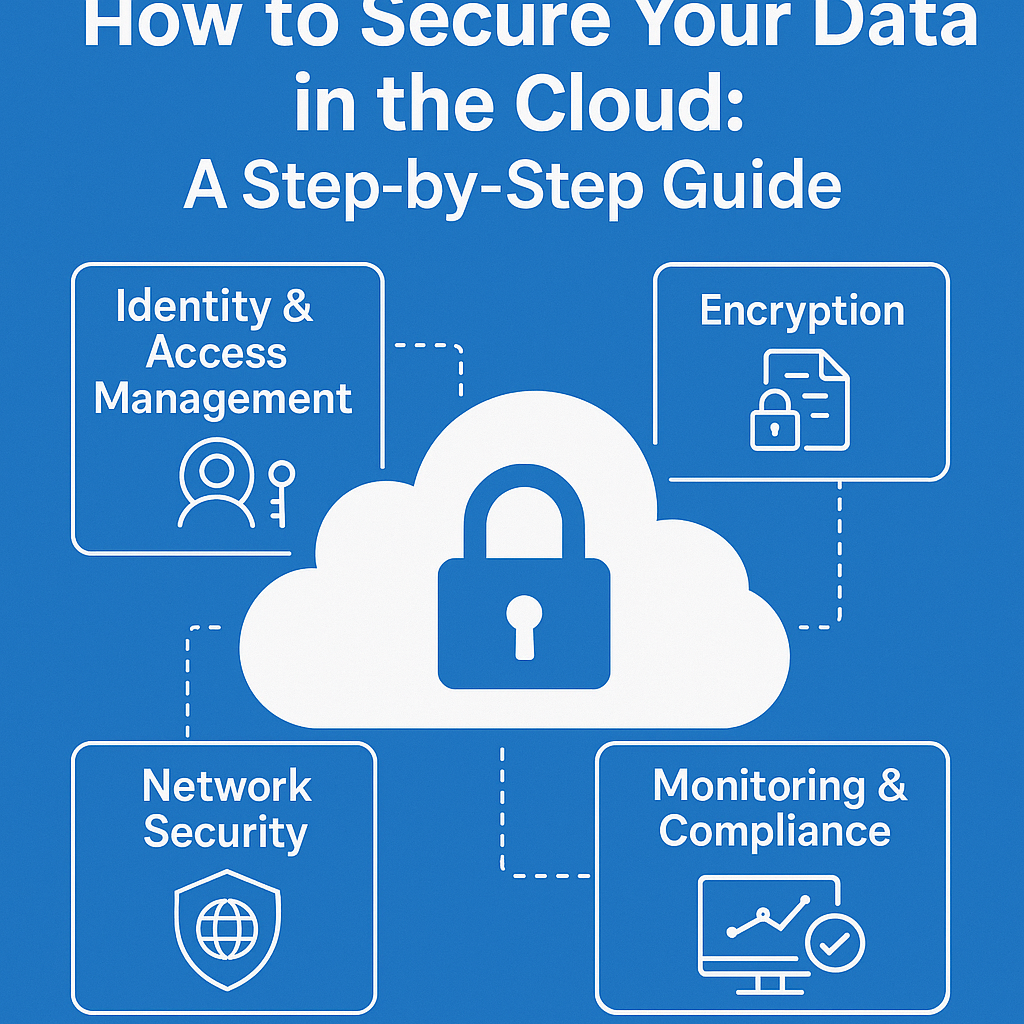
Storing and managing data in the cloud is now common in a world where digital is the first choice. Cloud services are used by businesses of all sizes because they are flexible, cost-effective, and can grow with the business. But these benefits come with a lot of security responsibilities. Data breaches, misconfigurations, and insider threats can have terrible effects, such as losing money, damaging your reputation, and getting fined by the government.
This step-by-step guide gives you a complete way to keep your data safe in the cloud by looking at people, processes, and technology. You will be able to do the following by the end of this article:
- Know what the shared responsibility model means and what your security duties are.
- Use encryption, tokenization, and access controls to protect and organize sensitive data.
- Set up strong identity and access management (IAM)
- Set up and protect network communications and settings
- Watch for, find, and deal with security events
- Set up rules for governance, compliance, and how to respond to incidents.
Let’s get started on your path to great cloud data security.
1. Accept the Shared Responsibility Model
1.1 What is the model of shared responsibility? Amazon Web Services (AWS), Microsoft Azure, and Google Cloud Platform (GCP) are all major cloud providers that use a shared responsibility model. This tells you who is in charge of which security controls.
| Responsibility of the Cloud Provider (“Security of the Cloud”) | Responsibility of the Customer (“Security in the Cloud”) |
| Infrastructure in the real world | Access controls and data classification |
| Hardware and software | Settings for the operating system, the network, and the firewall |
| Layer of virtualization | Security at the application level |
| Core networking | Management of identity and access |
Important Point: It’s important to understand this model. You can’t rely on your provider to handle all of your security needs. You are ultimately in charge of data encryption, IAM policies, and application security.
1.2 Look at the different types of providers
| Provider | Documentation for Shared Responsibility |
| AWS | AWS’s Shared Responsibility Model |
| Azure | Azure Security Duty |
| GCP | GCP Shared Responsibility Overview |
2. Sort and Keep Track of Your Data
2.1 Finding and sorting data You need to know where data lives and how sensitive it is before you can protect it. Use automated discovery tools like AWS Macie, Azure Purview, and Google Cloud Data Loss Prevention to look through storage buckets, databases, and file shares for:
- Information that can be used to identify a person (PII)
- Records of money
- Property of the Mind
- Business data that is owned by someone
Steps:
- List all of your cloud resources, such as S3 buckets, SQL instances, and blob storage.
- Give each item a sensitivity label: public, internal, confidential, or restricted.
- Tag Resources: Use cloud-native tagging to make sure your tags match your classification.
2.2 Set up a policy for classifying data Write down a clear policy that spells out the rules for how to classify things, (how to) handle them, how long to keep them, and how to get rid of them. For help, look at ISO/IEC 27001.
3. Put in Place Strong Identity and Access Management (IAM)
3.1 The Least Privilege Principle Give only the permissions that are absolutely necessary. Use either attribute-based access control (ABAC) or role-based access control (RBAC) to make sure that access is limited to specific people.
- AWS: IAM Roles and Policies
- Azure: Roles and Privileged Identity Management in Azure Active Directory
- GCP: Cloud IAM and Rules for Organizations
Best Ways to Do Things:
- Don’t use individual accounts; use groups or roles instead.
- Turn on MFA (Multi-Factor Authentication) for all accounts with special access.
- Use automated tools like AWS IAM Access Analyzer and Azure AD Access Reviews to check IAM permissions on a regular basis.
3.2 Federation and Single Sign-On (SSO) Use your company’s identity provider (IdP) to verify your identity. This puts control in one place and makes things easier to see. SAML, OAuth 2.0, or OpenID Connect can be used to support this.
3.3 Keys and Service Accounts
- Change your keys every 90 days or less.
- Check how service principals and API keys are being used.
- Use credentials that are specific to the task at hand instead of ones that are too broad.
4. Encrypt Data When It’s Not in Use and When It’s Moving
4.1 Encryption when not in use Use keys that are managed by the provider or the customer to encrypt storage volumes, databases, and object storage.
| Service for Managing Provider Keys |
| AWS AWS KMS (Key Management Service) |
| Azure Key Vault (Key Vault) |
| GCP Cloud KMS (Cloud Key Management) |
- Server-Side Encryption (SSE): The provider takes care of encryption.
- Client-Side Encryption (CSE): Your app encrypts data before sending it to the cloud. This is best for very sensitive data.
Important Tips:
- For the best key protection, use Hardware Security Modules (HSMs).
- Use different keys for each environment (development, staging, and production).
4.2 Encryption while in transit Keep data safe as it moves between clients, microservices, and databases:
- Make sure that all API endpoints use TLS 1.2 or higher.
- For service-to-service authentication, use Mutual TLS (mTLS).
- Check certificates with either internal or public CAs.
5. Architecture for a Secure Network
5.1 Design of the Virtual Private Cloud (VPC) Make sure your VPCs and subnets are set up for security zoning:
- Public Subnets: For NAT gateways and load balancers that connect to the internet.
- Private Subnets: These are where application servers and databases live, but they can’t connect directly to the internet.
- Bastion Hosts are hardened jump boxes in a separate subnet that only admins can use.
5.2 Controls for Network Access
- Security Groups and Network Security Groups work like virtual firewalls at the instance level.
- Network ACLs (NACLs): Stateless packet filters that work at the subnet level.
Some general rules:
- Deny everything by default and only let in what is needed.
- Keep track of and log connections that are denied.
5.3 Firewalls for Web Applications (WAF) Use WAF services like AWS WAF, Azure WAF, and Cloud Armor to block SQL injection, XSS, and the OWASP Top 10 threats.
6. Monitoring and Logging All the Time
6.1 Turn on logging that works in the cloud
- AWS CloudTrail for logs of API activity
- Azure Monitor and the Azure Activity Log
- GCP Cloud Audit Logs
Store logs in a central location that can’t be changed (write-once-read-many).
6.2 Finding and stopping intrusions Use services like AWS GuardDuty, Azure Sentinel, or GCP Security Command Center to:
- Find strange API calls
- Find out what reconnaissance activities are
- Warning about strange network traffic
6.3 Putting SIEM and SOAR together Put all of the logs into a Security Information and Event Management (SIEM) system, like Splunk, QRadar, or Azure Sentinel. Use Security Orchestration, Automation, and Response (SOAR) to automate responses, like putting an instance in quarantine.
7. Automated Compliance and Configuration Management
7.1 Infrastructure as Code (IaC) Use Terraform, AWS CloudFormation, or Azure Resource Manager to set up your infrastructure. Pros:
- Keeping track of different versions of configurations
- Infrastructure that can’t be changed
- Deployments and rollbacks that happen automatically
7.2 Code as Policy Use tools like AWS Config Rules, Azure Policy, and Google Cloud Organization Policy to make sure everyone follows the rules:
- Make sure that all storage is encrypted.
- Limit public S3/Blob buckets
- Set rules for tagging resources to show who owns them and how they are used.
7.3 Regular Audits and Tests of Penetration
- Use frameworks like CIS Cloud Benchmarks to do internal and external audits.
- Set up quarterly penetration tests to find weaknesses
8. Business Continuity, Data Backup, and Disaster Recovery
8.1 Plans for Backing Up
- Daily incremental backups and full backups every so often
- Cross-region replication protects against failures in one region.
- Immutable backups, like WORM storage, to stop ransomware from deleting files
8.2 Plans for Disaster Recovery (DR) Explain what RTO (Recovery Time Objective) and RPO (Recovery Point Objective) mean. Pick the right DR strategy:
- Pilot Light: Using as few resources as possible in the secondary region.
- Warm Standby: A smaller version of production in the DR region.
- Multi-Region Active-Active: Full redundancy deployment—most expensive, least downtime.
8.3 Regular DR Drills Every year, or whenever there are big changes to the architecture, test the failover procedures. Write down what you learned and update your runbooks.
9. DevSecOps and the Secure Development Lifecycle (SDLC)
9.1 Add security early on Add security checks to CI/CD pipelines to shift left:
- Static Application Security Testing (SAST)
- Software Composition Analysis (SCA) for flaws in open-source software
- Dynamic Application Security Testing (DAST) in test environments
9.2 Security for Containers and Serverless
- Check container images (like Clair and Trivy) for known CVEs
- Use as few base images and runtime policies as possible (for example, the AWS Lambda execution role least privilege).
- Set up Runtime Application Self-Protection (RASP) for your microservices.
10. Governance, Compliance, and Responding to Incidents
10.1 Set up a Cloud Security Governance Committee Include people from IT, security, legal, and business units to:
- Give the green light to policies
- Look over the audit results
- Keep making things better
10.2 Following the Rules Connect cloud controls to standards that are important to your field:
- PCI DSS for information about payments
- HIPAA for health information that is protected
- GDPR and PDPA protect personal data.
Use compliance reports and certifications from your provider, such as AWS Artifact and Azure Compliance Manager.
10.3 Plan for Responding to Incidents (IRP) Write down who is responsible for what, how to talk to each other, and how to escalate issues. Add playbooks for common situations like a data breach, a DDoS attack, or an insider threat. Do tabletop exercises once a year.
Conclusion
To keep your data safe in the cloud, you need to use a complete, multi-layered approach. You can build a strong defense-in-depth posture by knowing what your duties are under the shared responsibility model, classifying data correctly, enforcing least-privilege IAM, encrypting data, strengthening network architectures, and using continuous monitoring. To get real EEAT-aligned security, you need to add strict governance, compliance, and incident-response processes to these technical controls.
Keep in mind that cloud security is a journey, not a goal. Regularly review your controls, stay up to date on new threats, and create a culture of security awareness throughout your organization.
Questions That Are Often Asked (FAQs)
Q1. Is cloud storage safe by nature? No. Cloud providers do a good job of keeping their physical and infrastructure safe, but it’s up to customers to keep their data safe in the cloud by setting up encryption, access controls, and other security measures.
Q2. How often do I need to change my encryption keys? Change the keys that customers manage at least every 90 days, and change the credentials for service accounts every 60 to 90 days or as soon as you think they have been compromised.
Q3. What sets SSE apart from CSE?
- Server-Side Encryption (SSE): The provider encrypts data that is not being used with keys that you or they control.
- Client-Side Encryption (CSE): You encrypt data before uploading it, and the provider stores the ciphertext without being able to see the plaintext.
Q4. Which rules do cloud security have to follow? PCI DSS, HIPAA, GDPR, ISO/IEC 27001, SOC 2, and local data protection laws all depend on the industry and where you live.
Q5. How can I make sure that my cloud environment stays safe over time? Use automated auditing tools like AWS Config and Azure Policy, do regular penetration tests, and check security posture dashboards like GuardDuty, Security Hub, and Sentinel.
References
- Amazon Web Services, Shared Responsibility Model, https://aws.amazon.com/compliance/shared-responsibility-model/
- Microsoft Azure, Shared Responsibility in Azure, https://learn.microsoft.com/azure/security/fundamentals/shared-responsibility
- Google Cloud, Shared Responsibility Model, https://cloud.google.com/security/shared-responsibility-model
- National Institute of Standards and Technology, NIST SP 800-53: Security and Privacy Controls, https://nvlpubs.nist.gov/nistpubs/SpecialPublications/NIST.SP.800-53r5.pdf
- ISO, ISO/IEC 27001 Information Security Management, https://www.iso.org/isoiec-27001-information-security.html









5 Comments